
If you’re looking for a way to build great playlists with friends, you should consider the Spotify Blend feature. This feature allows you to create shared playlists with your friends and favorite artists. In this article, we’ll find out what Spotify Music Blend is and how to create it. Read on to find out!
What is Spotify Blend?
Spotify Blend is a feature that allows users to share music tastes with families, friends, and artists. Spotify blend works by generating and blending music playlists based on your and your friends’ musical preferences. The feature launches in August 2021 to make it easier for Spotify users (up to 10 people) to share and compare their music preferences.
With Spotify Blend, you can know better about tracks, albums, genres, and artists that you and your friends or family enjoy. You can also discover more music and podcasts through Spotify Blend playlists that have been shared with you.
Now you might be wondering “How to make a Spotify Blend?” Explore the answer below!
How to make Spotify Blend with friends and families?
Spotify Blend allows users to combine and update the playlists of up to 10 Spotify users to create a shared music and podcast playlist. Of course, you can mix playlists with users from different devices (e.g. Android, iPhone) or via web players.
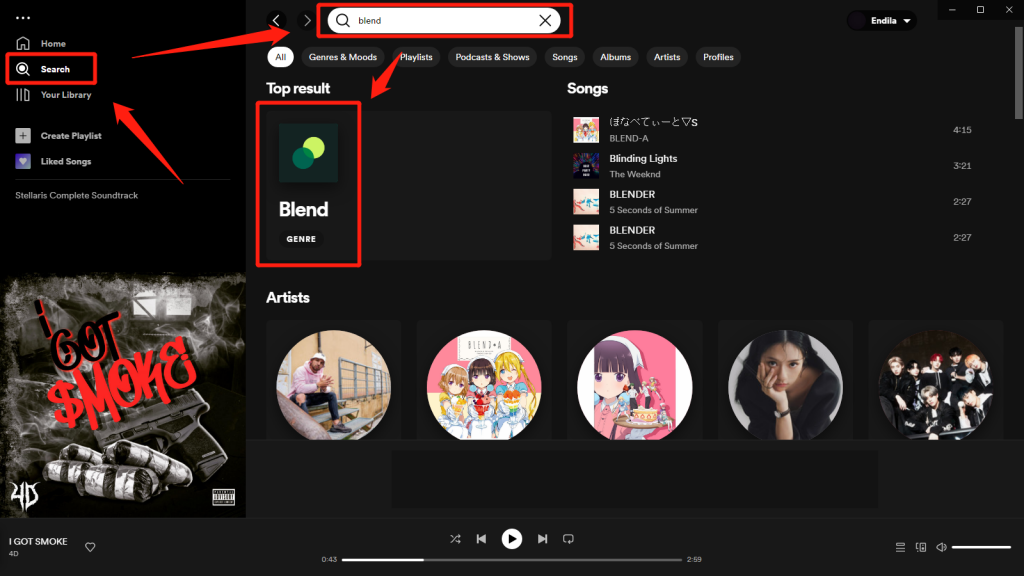
Here’s how to blend with friends and family on Spotify:
- Open the Spotify app or open the web player on your browser
- Go to the search section on Spotify and search for “Blend”
- Click on it and click the “Create a Blend” option
- To generate a Spotify Blend link, click on the “Invite” button to share it with others
- Send the link you got to anyone in the blend group and wait for them to accept your invite
Once done, Spotify will generate a new playlist for your Blend group. You should note that anyone you add to Spotify Blend will get a custom share card that they can use on any social media platform like Instagram, Facebook, Twitter, etc.
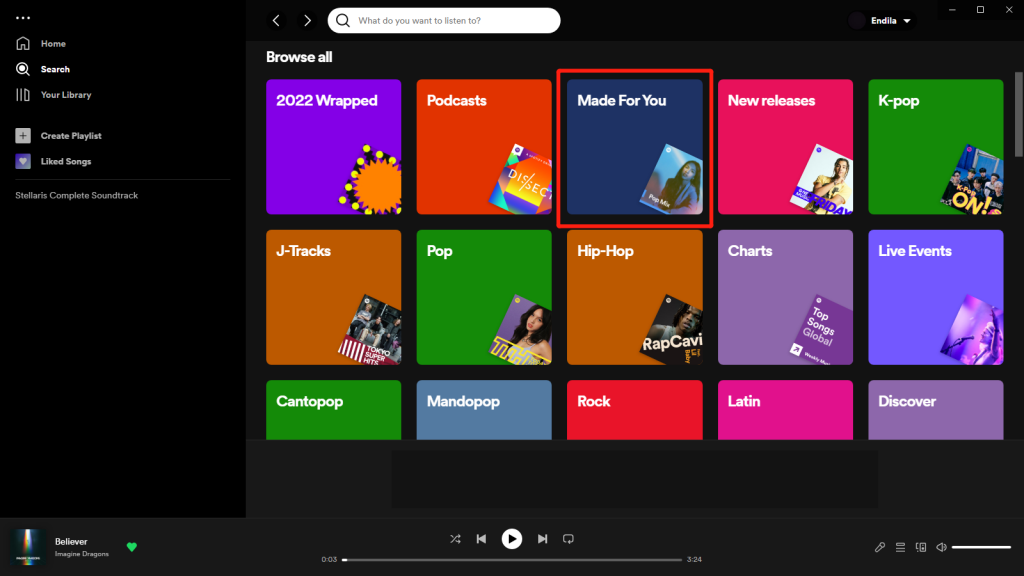
Another way to create a Spotify Music Blend with your friends is:
- Open the Spotify app on your device
- Select the “Made for You” option from the search page, you’ll see the “Made for Us” section
- Click on “Create a Blend” to create a new blend
- Send the Spotify Blend link to your friends or families
Once your mix is set up and your friends or family join in, you can find your mix in the “Made for you” section. You can also find it under playlists in your media library. Also, you should know that every time a new member is added to the group, the songs in the playlist will be updated to suit everyone’s taste.
How to make a Spotify Blend with artists you like
If you are curious about your favorite artists’ music preferences, you can use Spotify Blend to create blends with your favorite artists. The Spotify Blend feature allow you to connect with both friends and artists who created public playlist. Please note, the Blend with your favorite artists can only be accessed by yourself. That said, you won’t be able to share your artist’s Spotify Blend link with your friends and family.
Here’s how to blend with artists on Spotify:
- Open your Spotify app or web player
- Search for the artists’ names on Spotify
- Find the ‘Artist’s Pick’ section in their Spotify profile.
- Get the artist’s Spotify Blend invite link.
- Click on the link and Spotify will automatically create a Blend playlist for you and the artist
Still, when it comes to blend Spotify playlists with your favorite artists, you should know that not all artists offer a blending feature or an “artist pick” section on their Spotify account. No artist pick could be because the artist has not activated the Blend on their Spotify account.
There are 20 artists’ Blend invite links in this article. Just open it on your phone, scroll to the bottom, and tap your favorite artist to access the link.
How to share the blend story
Using a Spotify blend is a great way to connect with family and friends through music. It’s also an opportunity to gain insight into the musical tastes of your favorite artists. With Spotify blend, you and your friends in a blend group can create playlists based on each member’s musical tastes. Users on Spotify blend can share their blend stories. They only have to:
- Go to “Blend” and click on the options icon
- Select view blend story and share
Also, both free and premium Spotify users can use ‘”Blend” to create a playlist with their family and friends.



-副本.png)
Leave a Reply